Created At
Jul 28, 2025
Created By SmartHomeEddy
Get realtime data from your SolarEdge Setup using the Modbus
Created At
Jul 28, 2025
Last Update
Sep 02, 2025
Platforms
HC 3 Lite, Z-box Hub, Yubii Home Pro, Yubii Home, Venture WISE, HC 3
Views
3393
Download
117
This is the next version 1.2 of the SolarEdge Live (Modbus) QuickApp.
The SolarEdge Live (Modbus) QuickApp represents an advanced integration that provides instant, real-time access to local inverter data without the limitations of cloud-based API’s. This QuickApp uses the Modbus of your SolarEdge Inverter to get the real-time information about your SolarEdge setup. The QuickApp reads the SolarEdge SunSpec Modbus registers and shows the with QuickApp variables requested register values in child devices and labels. The QuickApp runs at an interval setup in the QuickApp variables. A special button is available to adjust the speed up the interval.

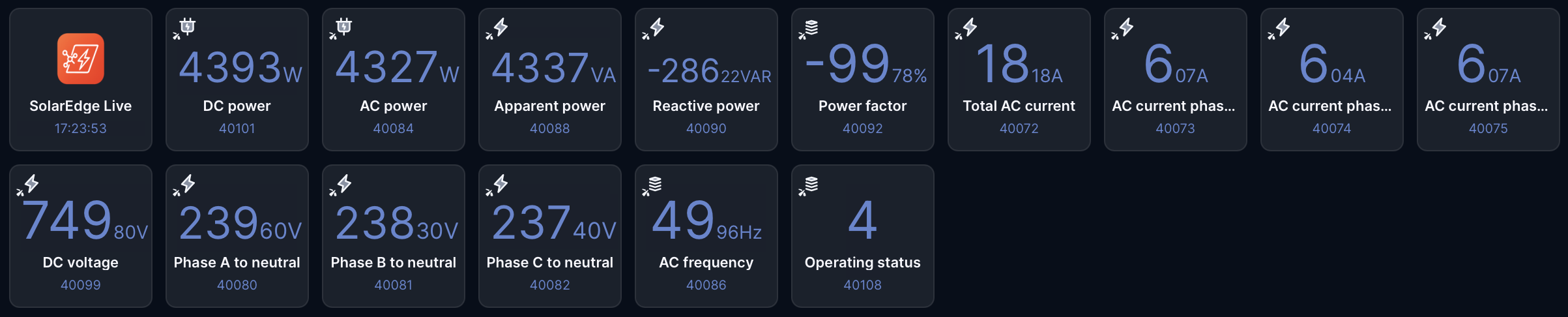
Example QuickApp Variables with register addresses and devicetypes:

Enabling Modbus on SolarEdge Inverters:
To enable Modbus communication on a SolarEdge inverter, follow these general steps:
After activation, the inverter is ready to communicate with external systems or monitoring solutions using the Modbus protocol. Always consult your inverter’s user manual for detailed instructions specific to your model.
Important documentation for the right register addresses (use the base 1 address):
https://knowledge-center.solaredge.com/sites/kc/files/sunspec-implementation-technical-note.pdf
Disclaimer:
Use this QuickApp at your own risk. You are responsible for ensuring that the information provided via this QuickApp do not contain errors. SolarEdge is a registered trademark being the property of SolarEdge. SolarEdge reserves all rights to the registered trademarks. Information which is published on SolarEdge’s websites belongs to SolarEdge or is used with the permission of the rights holder. Making of copies, presentations, distribution, display or any other transfer of the information on the website to the public is, except for strictly private use, prohibited unless done with the consent of SolarEdge. Published material on dedicated SolarEdge press websites, intended for public use, is exempt from the consent requirement.
Changes version 1.2 (2nd September 2025)
Variables (mandatory and created automatically):

How to install:
(This download contains several example register addresses, but you can choose you own register addresses to create your child devices)
What variable should I add to be able to see the kW produced by the photovoltaic system, the kW consumed by my home, the kW fed into the national electricity grid, and the kW used for self-consumption from my SolarEdge SE4000 inverter? I don't have a storage battery at the moment. I can see the graph of the above in the SolidEdge portal. I would like to extract them with the Modbus channel and view them in Fibaro 3. Thanks. Best regards, Claudio

The new version 1.2 of the SolarEdge Live QuickApp is available!
Changes version 1.2 (2nd September 2025) - Changed the main device type to com.fibaro.powerMeter, so it can contain the AC Power value. - Added QuickApp variable for the main device register, mainRegister (default = 40084 AC Power). - Added default don't 'Save events to History' (saveLogs = false) to the setup of every child device. - Disabled the warnings for READ, WRITE and Invalid response. Users can't prevent those errors and to display them as warnings only clutters the logging. - Changed the text of the interval speed buttons to the content of the quickapp variables intervalChildsS, intervalChildsM and intervalChildsF. - Found a few old SolarEdge Modbus QuickApp names in the code and changed them also to SolarEdge Live. - Optimised the register mapping. - Changed the default interval timing to 60, 10 and 5 seconds. Of course, you can use your own settings. - Removed the expiration date.
To put one of the registers in the spotlight, “operating status” with address 40108. You can monitor your SolarEdge Inverter with (for example) a simple blockscene. I_STATUS_OFF --> 1 --> Off I_STATUS_SLEEPING --> 2 --> Sleeping (auto-shutdown) – Night mode I_STATUS_STARTING --> 3 --> Grid Monitoring/wake-up I_STATUS_MPPT --> 4 --> Inverter is ON and producing power I_STATUS_THROTTLED --> 5 --> Production (curtailed) I_STATUS_SHUTTING_DOWN --> 6 --> Shutting down I_STATUS_FAULT --> 7 --> Fault I_STATUS_STANDBY --> 8 --> Maintenance/setup Especially status 1, 5, 7 and 8 are the interesting statuses to monitor.

Hi, you can use the other quickapp, SolarEdge Monitor, to get those values.